woensdag 24 augustus 2011

Funny IT / Developer pictures

Last month I closed off with some funny programming quotes, this time I'm taking the visual road:


This one has got nothing to do with IT but it's funny as hell:


Have fun ;-)

woensdag 17 augustus 2011

Get the targetframework for an assembly

This is going to be a short post but I thought it might be useful for someone that encountered the same question.  So we basically have a number of options to get our targetframework from our assembly.  I’ll list three of my favored ones here:

ILDASM

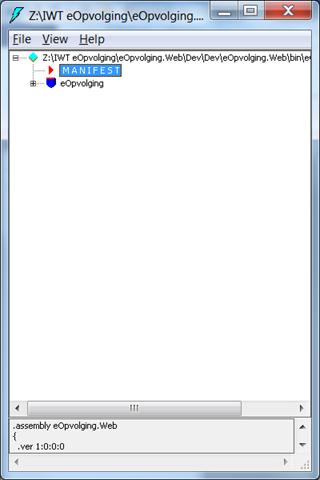
This is a tool to inspect the generated IL of our code.  The cool thing about this tool is that we can also take a look at our manifest and see what the required framework is.
First launch the VS command prompt and type in ildasm.

From here the tool will launch and you’ll be able to select an assembly.


Once an assembly is selected we can view the manifest and retrieve the target framework.


DotPeek


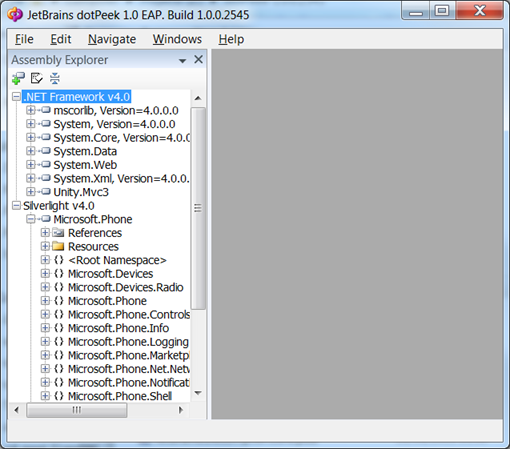
This is a no-brainer so I’m just going to provide you with a screenshot and a link to download this awesome tool.


From code

Last but certainly not least, we can load the assembly in code and get the TargetFrameworkAttribute from code.
var asm = Assembly.LoadFile(@"…");
var targetFrameworkAttributes = asm.GetCustomAttributes(typeof(System.Runtime.Versioning.TargetFrameworkAttribute), true);
if (targetFrameworkAttributes.Length > 0)
{
    var targetFrameworkAttribute = (TargetFrameworkAttribute)targetFrameworkAttributes.First();
    Console.WriteLine(targetFrameworkAttribute.FrameworkDisplayName);
}

I included a sample here.

Small note:  Make sure that you have your dependencies in the same folder or the assembly will fail to load.

That’s it, I hope it was of use to anyone :-)

dinsdag 16 augustus 2011

Compiler optimization with the shift operator


The other day I came across a peculiar operator in .NET called the shift operator.  I’ve seen it before in theory but I’ve never encountered a practical use for them.
For anyone who doesn’t know what the shift operator is, here is an explanation stolen from MSDN:

The right-shift operator (>>) shifts its first operand right by the number of bits specified by its second operand.
The left-shift operator (<<) shifts its first operand left by the number of bits specified by its second operand.

So simply put, when you have an integer that looks like this binary: 001000100 and you apply the right shift operator on it by 2 then you get 000010001.  For what could this be useful besides bit operations?
Well whenever you do a multiple or divide with a power-of-two number then you can use the shift operation to make this go faster.  Here is a small code sample to illustrate:

int nr;
int result;
var stopwatch = new Stopwatch();

nr = 5;

stopwatch.Start();
result = nr * 4;
stopwatch.Stop();

Console.WriteLine(result);
Console.WriteLine("{0} ms ellapsed", stopwatch.Elapsed);
stopwatch.Reset();

stopwatch.Start();
result = nr << 2;
stopwatch.Stop();

Console.WriteLine(result);
Console.WriteLine("{0} ms ellapsed", stopwatch.Elapsed);

So when we run this we get the following output:


As you can see the shift operator is almost an order of magnitude faster than the multiply operator yet they do exactly the same thing.  I saw allot of threads on stackoverflow (1, 2, ...)  telling people that you don’t have to worry about this kind of stuff because the compiler will optimize this for you, but a real life code sample demonstrates that this is not true.  Flipping the optimization flag doesn’t change the way the IL is generated nor does it change the way the JIT compiles the IL.  This is based on the results of this example.

Should you use the bit operator for code optimization?  I would recommend you not to do so unless you have to do very long and heavy calculations.  The reason for this is that it makes you code unreadable.  There are many programmers (even seasoned ones) out there that haven’t even heard of the bit shift operator.  When they’ll see your code they won’t be able to make head or tails out of it.  In most cases the advantage of optimizing your code in this way will be nullified by the decrease of readability of your code.   Of course when you’re doing bitwise operations you should use it when necessary.

Till next time

dinsdag 9 augustus 2011

Code Retreat Agile Minds

This Saturday I’ve had the pleasure of attending a code retreat hosted by Agile Minds.  The hosts were Erik Talboom and Adrian Bolboaca.  In case you don’t know what a code retreat is, here is a quick explanation:

A code retreat is an event where a bunch of geeks… euh fellow developers come together to spend their united time coding.  You get 45 minutes to code the assignment which is Conway’s Game of Life.  It might seem boring implementing the same problem over and over but I guarantee you that no implementation of this problem is ever the same. 

The goal of the event isn’t to finish the task at hand but to write the cleanest code possible.  For us developers this is hard to grasp because we have the urge to deliver. But delivering a final product is at the bottom of the priority list here.  

The assignment has to be coded in pair.  After every 45 minutes you have to switch pairs.  This makes it even more interesting because every time you start a new session, you are forced to reconsider your implementation with the ideas of the person you’ve paired up with.  It’s not allowed to pair up with someone twice so you’ll always have a different angle to tackle the problem.

At the start of the event Erik gave us a few recommendations.  He said that you’re not obligated to follow them but it’s strongly recommended that you do so.  One of the recommendations was that you write your code in a TDD fashion.  I’ve had some practical experience working test driven but I didn’t know you could take it that far.  One of the eye openers was TDD as if you meant it.

I’ve already done a code retreat once hosted by my employer, but this code retreat was different in several aspects.  The people in this code retreat were total strangers to me (except for one colleague of mine). I found it very interesting to pair up with people you’ve never seen before because you didn’t know what to expect from them.  It was also different in the way that this code retreat was language agnostic, meaning it didn’t matter what your preferred language was. There were people doing java, ruby, C#, python, etc.  I loved this aspect of the code retreat as it gave me the chance of trying out Ruby and Python, languages I’ve never done before.

It surprised me that there were a few people who had difficulty grasping the concepts of a code retreat.  They were stuck with the notion of delivering a final product and didn’t seem to be able to get their heads around the fact that a code retreat does not equal a coding dojo or programming contest :-). Though I think at the end of the day everyone had a fair idea of what to do.

It was really fun participating in this code retreat and I’m certainly joining the next one.  The learning experience was awesome.  Some of the stuff I’ve kept in the back of my head is:
  • Let TDD drive your design
  • Doing TDD will help you archive other solutions for your problem instead of the predefined one in your head
  • Everyone has a different angle for the same problem.  Combining insights can deliver promising results!
  • Having 2 keyboards is very useful when programming in pair
  • I’ve got to try out ruby
  • Python is one damn ugly language
Certainly take a look at the website of Agile Minds and join us next code retreat (recursion joke...)!

donderdag 4 augustus 2011

Html + jQuery vs Silverlight: part 3. Graphs

In the previous Html + jQuery vs Silverlight blogposts (1) (2) I discussed animations and how the two technologies compared to each other. Now we will see how the two measure up when displaying statistical data.

For the Silverlight side I will be using the Silverlight toolkit.  Granted that there are better solutions but most of these have a price tag assigned to them.  For the jQuery I will be using jqPlot.  I’m not sure whether this is the best solution but there are so many of these libraries out there that it is impossible to try them all out.  If you find that you have a better alternative than by all means post it.

The datasource I will be using for both examples is a fictional list of visitors for a blog. 
So let’s start building.  As usual I’ll be starting with Silverlight since this is the technology I have the most experience with. 

So at first we create a datasource for the graphs to be able to bind to:

Resources.Add("PageViews", new List<PageView>()
                {
                    new PageView(){Amount = 5000, Date = new DateTime(2011,1,1)},
                    new PageView(){Amount = 6000, Date = new DateTime(2011,2,1)},
                    new PageView(){Amount = 7000, Date = new DateTime(2011,3,1)},
                    new PageView(){Amount = 7500, Date = new DateTime(2011,4,1)},
                    new PageView(){Amount = 8100, Date = new DateTime(2011,5,1)}
                });

Now that this is done we create our graphs in the page and databind to our datasource:

<toolkit:Chart Grid.Row="0">
    <toolkit:Chart.Series>
        <toolkit:ColumnSeries
                    ItemsSource="{StaticResource PageViews}"
                    IndependentValueBinding="{Binding Date}"
                    DependentValueBinding="{Binding Amount}"/>
    </toolkit:Chart.Series>
</toolkit:Chart>
<toolkit:Chart Grid.Row="1">
    <toolkit:Chart.Series>
        <toolkit:PieSeries
                    ItemsSource="{StaticResource PageViews}"
                    IndependentValueBinding="{Binding Date}"
                    DependentValueBinding="{Binding Amount}"/>
    </toolkit:Chart.Series>
</toolkit:Chart>
<toolkit:Chart Grid.Row="2">
    <toolkit:Chart.Series>
        <toolkit:LineSeries
                    ItemsSource="{StaticResource PageViews}"
                    IndependentValueBinding="{Binding Date}"
                    DependentValueBinding="{Binding Amount}"/>
    </toolkit:Chart.Series>
</toolkit:Chart>

So that's it for Silverlight. How does jQuery compare towards this slick implementation?  Not that different!
Again we create our datasource:

var data = [['2011-01-01', 5000], ['2011-02-01', 6000], ['2011-03-01', 7000], ['2011-04-01', 7500], ['2011-05-01', 8100]];

Then we speak to our third party library to plot the graphs:

var line = $.jqplot('chart1', [[5000,6000,7000,7500,8100]], {
    cursor: { show: true },
    highlighter: { show: true },
    seriesDefaults: {
        renderer: $.jqplot.BarRenderer,
        rendererOptions: { fillToZero: true }
    },
    axesDefaults: {
        labelOptions: {
            fontSize: '13pt'
        }
    }
});


var pie = $.jqplot('chart2', [data], {
    series: [{
        renderer: $.jqplot.PieRenderer,
        rendererOptions: {
            sliceMargin: 3,
            showDataLabels: true,
            dataLabelNudge: 20
        }
    }],
    legend: {
        show: true
    }
});

var bar = $.jqplot('chart3', [data], {
    axesDefaults: {
        labelRenderer: $.jqplot.CanvasAxisLabelRenderer,
        labelOptions: {
            fontSize: '13pt'
        }
    },
    axes: {
        xaxis: {
            renderer: $.jqplot.CategoryAxisRenderer
        }
    }
});

The chart1, chart2 and chart3 identifiers are from 3 divs declared in the body:

<div id="chart1" style="height: 300px; width: 600px;">
</div>
<div id="chart2" style="height: 340px; width: 500px;">
</div>
<div id="chart3" style="height: 340px; width: 500px;">
</div>
So both implementations are pretty smooth, although it is pretty obvious that the XAML is way more expressive than the jQuery. Why would you favor jQuery over Silverlight then?  The usual Achilles heel of Silverlight is the plugin so I’m not bothering elaborating that even further.   

Rendering

This was a remark I made in the previous post but in this library I can’t say the Silverlight implementation is that much better than the jQuery implementation.  It does have some better rounded edges and the rendering has no difference in between browsers but besides that they both look nice.


Browser support:

It was fun to see that both examples worked in all browsers for both solution soI have no problem here.

Performance:

The drawing is pretty much identical on both technologies, yet if you opt for the Silverlight solution then you have the drawback of downloading the XAP.  The size of the XAP when fully stripped of all unnecessary assemblies is 360 KB, while the jquery solution with all scripts would account for 210 KB.  That’s not a big difference! The problem however is that the XAP still needs to be processed and loaded into the runtime.  For that reason the Silverlight solution takes around 3 times longer to load then the jQuery solution.

To conclude I would say that this round is favored for jQuery.  It’s much faster (to load) and there is a whole arsenal of free libraries at your disposal.  The rendering is pretty much the same and you don't need a plugin.

Till next time!

donderdag 28 juli 2011

Funny programming quotes

To close of this month, here are some programming quotes that made me laugh out loud :)

Programming is like sex: one mistake and you’re providing support for a lifetime.

Always code as if the guy who ends up maintaining your code will be a violent psychopath who knows where you live

The C programming language -- a language which combines the flexibility of assembly language with the power of assembly language.

Any fool can use a computer.  Many do.

To iterate is human, to recurse divine.

In order to understand recursion, one must first understand recursion.

Real programmers don't comment their code. If it was hard to write, it should be hard to understand.

Managing programmers is like herding cats.

Weeks of programming can save you hours of planning.

There are only two kinds of programming languages: those people always bitch about and those nobody uses.

The last good thing written in C was Franz Schubert's Symphony Number 9.

I’ve finally learned what ‘upward compatible’ means.  It means we get to keep all our old mistakes

There are two major products that come out of Berkeley: LSD and UNIX.  We don’t believe this to be a coincidence.

The most amazing achievement of the computer software industry is its continuing cancellation of the steady and staggering gains made by the computer hardware industry.

No matter how slick the demo is in rehearsal, when you do it in front of a live audience, the probability of a flawless presentation is inversely proportional to the number of people watching, raised to the power of the amount of money involved.

The best method for accelerating a computer is the one that boosts it by 9.8 m/s2.

Without requirements or design, programming is the art of adding bugs to an empty text file.

Deleted code is debugged code.

Software is like sex: it’s better when it’s free.

Programming today is a race between software engineers striving to build bigger and better idiot-proof programs, and the Universe trying to produce bigger and better idiots. So far, the Universe is winning

If debugging is the process of removing software bugs, then programming must be the process of putting them in.

Software and cathedrals are much the same – first we build them, then we pray

I have always wished for my computer to be as easy to use as my telephone; my wish has come true because I can no longer figure out how to use my telephone.

But it works on my machine!

vrijdag 22 juli 2011

Create your own simple intellisense for .NET

I was playing around with the source code of STFUandCode to add a little intellisense and I thought it might be usefull to post some of the code here.

So for this simple example I’ll just create an intellisense that gives you information about the mscorlib assembly.  If you want you can adjust the code to include other assemblies as well.  The first thing we need to do is get the assembly with reflection:

Assembly assembly = Assembly.GetAssembly(typeof(object));

You see I do this by getting the type of object.  The reason why I do this by type and not by name is so that you can use this code for any .NET version you want, because it will resolve the core lib by the type so you’re not bound by any version.  The next step is to get all the types out of this assembly like so:

private static Type[] GetTypes()
{
    Assembly assembly = Assembly.GetAssembly(typeof(object));
    Type[] types = assembly.GetTypes();
    return types;
}

Pretty easy.  Then the only thing we need to do is to filter out the types we want.  Imagine the user typing in:

System.Cons

Then it’s our job to disassemble the string and compare it to the types in the assembly:

private static IEnumerable<string> GetSuggestionsForClasses(string statement)
{
    // Get the last chain in the statement which is in most cases a part of the type name
    var lastStatementChain = (statement.Split('.').LastOrDefault() ?? "").Trim();

    var typeNamespace = GetNamespace(statement);
    var types = GetTypes();

    // Filter by type
    var allTypes = types.Where(x => x.Namespace.Equals(typeNamespace) && x.Name.Contains(lastStatementChain))
                        .Select(x => x.Name);
  
    // filter by namespace
    var allNameSpaces = types.Where(x => !String.IsNullOrEmpty(x.Namespace) &&
                                        x.Namespace.Contains(typeNamespace))
                             .Select(x => x.Namespace);

    // Join types and namespaces
    return allTypes.Union(allNameSpaces).OrderBy(x => x);
}

private static string GetNamespace(string statement)
{
    var typeNamespace = "System";
    var hasNameSpace = statement.Split('.').Count() > 1; // If the statement is chained by a dot

    if (hasNameSpace)
    {
        typeNamespace = statement.Substring(0, statement.LastIndexOf('.')).Trim(); // Extract the namespace
    }
    return typeNamespace;
}

This way we get intellisense with type and namespaces.  We can take it a step further and detect if what the user typed in was already a type and we should show its members:

if (types.Any(x => TypeEqualsStatement(statementTrimmed, x)))
{
    return GetSuggestionsForType(statementTrimmed);
}

Then to see whether the statement equals a type we use the following method:

private static bool TypeEqualsStatement(string statementTrimmed, Type x)
{
    // if we have an empty statement then it's impossible to have a type
    if (string.IsNullOrWhiteSpace(statementTrimmed))
        return false;

    // Get the last chain
    var lastSeperator = statementTrimmed.LastIndexOf('.');
    lastSeperator = lastSeperator == -1 ? 0 : lastSeperator;
    var statementedSubtrimmed = statementTrimmed.Substring(0, lastSeperator);

    // Compare to the statement minus the last chain and the last chain because the last chain can be a part of the type member
    return x.FullName.Equals(statementTrimmed) || (!string.IsNullOrEmpty(statementedSubtrimmed) && x.FullName.Equals(statementedSubtrimmed));
}

We always have to be careful that we compare with and without the last chain of the method.  The reason for this is that the user could have already typed in a part of a member of the type.  For example if he typed in: ‘System.Console.Wr’   then the Wr is a piece of the member and we must ignore this when searching for the type.  The last step is then to give a summary of all the members in the type:

private static IEnumerable<string> GetSuggestionsForType(string statement)
{
    var types = GetTypes();
    var type = types.FirstOrDefault(x => TypeEqualsStatement(statement, x));
    var lastChain = statement.Substring(statement.LastIndexOf('.')).Trim('.', ' ');

    if (type == null)
        return new List<string>();

    // if the last chain is the type itself then we give a full list of it's members
    if (type.FullName.EndsWith(lastChain))
        return type.GetMembers().Select(x => x.Name)
                                .Distinct();

    // if the last chain isn't the type itself then we filter the members
    return type.GetMembers().Where(x => x.Name.Contains(lastChain))
                            .Select(x => x.Name)
                            .Distinct();
}

We can then poor this Enumerable of strings inside the listbox of a popup and show it under the text.  If you're curious in how to align this popup under the desired text then look at this post.

That’s how you can build a simple intellisense!

Until next time.